
Netty进阶
实际开发中绕不开的四件事:编解码、粘包拆包、心跳检测和断线重连,本文 Maven 依赖仍是 io.netty:netty-all:4.2.18.Final,线程组统一用 MultiThreadIoEventLoopGroup 配合 NioIoHandler.newFactory() 创建。
4.2 的线程组写法
4.2 开始 NioEventLoopGroup 和 NioEventLoop 已经标记为 @Deprecated:线程组改用 MultiThreadIoEventLoopGroup,事件循环由 SingleThreadIoEventLoop 承担,再配合 NioIoHandler.newFactory() 接入 NIO。
1. Netty 编解码
1.1 编解码相关组件
数据在 Channel 上流动,经过 ChannelPipeline 里的 ChannelHandler 完成处理。先分清这三个组件各自的职责。
Channel
网络连接的载体,读到的字节和写出的字节都要经过它;每个 Channel 创建时都会绑定一个 ChannelPipeline。
ChannelHandler
ChannelHandler 是入站和出站数据的处理容器。入站数据实现 ChannelInboundHandler(通常继承 ChannelInboundHandlerAdapter 或 SimpleChannelInboundHandler),在 channelRead 里接收数据、执行业务;需要给客户端回数据时,也可以在这里直接 writeAndFlush。出站数据实现 ChannelOutboundHandler,处理写出去的数据。业务逻辑通常写在一个或多个 handler 里。
ChannelPipeline
ChannelPipeline 是 handler 链的容器。每个 Channel 有且只有一个 pipeline,里面的 handler 按添加顺序挂在一条由 ChannelHandlerContext 组成的双向链表上。事件在链上的传递方向由事件类型决定:
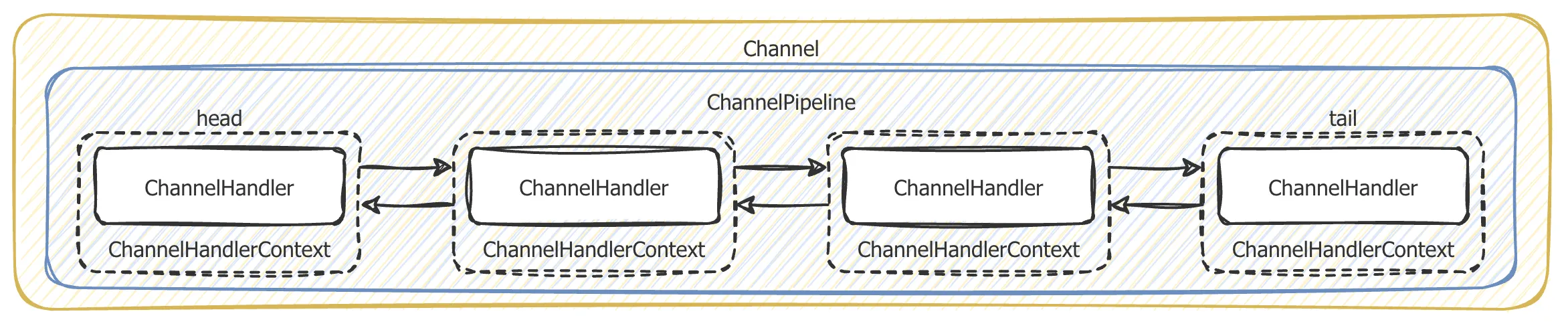
| 事件类型 | 方向 | 传递顺序 | 处理者 |
|---|---|---|---|
| 入站 | 数据从对端进来 | head → tail | ChannelInboundHandler |
| 出站 | 数据从本端写出去 | tail → head | ChannelOutboundHandler |
这里的入站/出站是相对当前 Channel 而言的:客户端发数据,对客户端是出站,对服务端就是入站。入站事件由 ChannelInboundHandler 处理,出站事件由 ChannelOutboundHandler 处理,两类 handler 互不干扰。
1.2 编解码器
发送或接收消息时都会发生一次数据转换:入站把字节解码成 Java 对象,出站把 Java 对象编码成字节。
Netty 的编解码器本质上也是 handler:解码器实现 ChannelInboundHandler,在 channelRead 里调用 decode(),把解码结果通过 fireChannelRead 交给下一个 handler;编码器实现 ChannelOutboundHandler,在 write 里调用 encode(),把对象写成 ByteBuf。
常用的内置编解码器:
| 编解码器 | 作用 | 说明 |
|---|---|---|
StringEncoder / StringDecoder | 字符串与 ByteBuf 互转 | 建议显式指定字符集(如 CharsetUtil.UTF_8),避免依赖系统默认编码 |
ObjectEncoder / ObjectDecoder | Java 对象序列化 | 基于 JDK 序列化,体积大、跨版本兼容性差;4.2.18 中仍标记为 @Deprecated(安全风险),不建议生产使用 |
ProtobufEncoder / ProtobufDecoder | protobuf 编解码 | 需要 .proto 文件和生成的类 |
自定义编解码器时,编码器继承 MessageToByteEncoder<T>,解码器继承 ByteToMessageDecoder。解码器要自己处理半包:decode 里先判断可读字节数够不够一个完整包,不够就直接返回,等下一批数据到了再解。
如果要实现高效的编解码可以用 protobuf,但它需要维护大量 .proto 文件,改字段就得重新生成代码。protostuff 基于 protobuf 的编码格式,运行时生成 Schema,不用写 .proto 文件,性能损耗也很小,用起来更轻。
protostuff 与 Netty 版本无关。原始示例里的 com.dyuproject.protostuff:1.0.10 比较旧,本文示例用同坐标的 1.3.1,只声明 protostuff-core 和 protostuff-runtime,protostuff-api 会由 core 传递引入。新项目可以换成 io.protostuff:1.8.0,但 Maven 坐标和 import 的包名都要从 com.dyuproject.protostuff 改成 io.protostuff。
1.3 protostuff 依赖与序列化工具
先加依赖:
<dependency>
    <groupId>com.dyuproject.protostuff</groupId>
    <artifactId>protostuff-core</artifactId>
    <version>1.3.1</version>
</dependency>
<dependency>
    <groupId>com.dyuproject.protostuff</groupId>
    <artifactId>protostuff-runtime</artifactId>
    <version>1.3.1</version>
</dependency>
User 是示例实体。protostuff 反序列化时依赖无参构造函数,所以无参构造必须保留;实现 Serializable 只是为了兼容 Java 原生序列化的示例,protostuff 本身不需要。
package com.juzicoding.netty.codec;

import java.io.Serializable;

/**
 * 编解码示例使用的用户实体。
 * <p>
 * protostuff 反序列化时依赖无参构造函数,因此需要保留 {@link #User()};
 * 实现 {@link Serializable} 是为了兼容 Java 原生序列化的示例代码。
 *
 * @author 橘子coding
 */
public class User implements Serializable {

    /**
     * 用户 ID
     */
    private int id;

    /**
     * 用户名
     */
    private String name;

    /**
     * 无参构造函数,供反序列化框架创建对象。
     */
    public User() {
    }

    /**
     * 创建用户对象。
     *
     * @param id   用户 ID
     * @param name 用户名
     */
    public User(int id, String name) {
        super();
        this.id = id;
        this.name = name;
    }

    /**
     * 获取用户 ID。
     *
     * @return 用户 ID
     */
    public int getId() {
        return id;
    }

    /**
     * 设置用户 ID。
     *
     * @param id 用户 ID
     */
    public void setId(int id) {
        this.id = id;
    }

    /**
     * 获取用户名。
     *
     * @return 用户名
     */
    public String getName() {
        return name;
    }

    /**
     * 设置用户名。
     *
     * @param name 用户名
     */
    public void setName(String name) {
        this.name = name;
    }

    /**
     * 返回便于打印的对象描述。
     *
     * @return 包含 id 和 name 的字符串
     */
    @Override
    public String toString() {
        return "User{" +
                "id=" + id +
                ", name='" + name + '\'' +
                '}';
    }

}
ProtostuffUtil 把序列化和反序列化封装成两个静态方法:
serializer通过RuntimeSchema取到Schema,再用ProtostuffIOUtil.toByteArray写成byte[];deserializer先反射创建空对象,再用mergeFrom把字节填进去;Schema的创建开销较大,用ConcurrentHashMap按Class缓存;LinkedBuffer用完必须在finally里clear(),否则复用时会带上脏数据。
package com.juzicoding.netty.codec;

import com.dyuproject.protostuff.LinkedBuffer;
import com.dyuproject.protostuff.ProtostuffIOUtil;
import com.dyuproject.protostuff.Schema;
import com.dyuproject.protostuff.runtime.RuntimeSchema;

import java.util.Map;
import java.util.concurrent.ConcurrentHashMap;

/**
 * protostuff 序列化工具类,内部使用 protobuf 的编码格式。
 * <p>
 * Schema 的创建开销较大,这里用 ConcurrentHashMap 按类型缓存;LinkedBuffer
 * 使用完毕后必须调用 {@link LinkedBuffer#clear()},避免复用脏数据。
 *
 * @author 橘子coding
 */
public class ProtostuffUtil {

    /**
     * 按类型缓存的 Schema,RuntimeSchema 本身是线程安全的
     */
    private static final Map<Class<?>, Schema<?>> cachedSchema = new ConcurrentHashMap<Class<?>, Schema<?>>();

    /**
     * 获取指定类型的 Schema,优先从缓存中读取。
     *
     * @param clazz 目标类型
     * @param <T>   目标类型
     * @return 对应的 Schema
     */
    private static <T> Schema<T> getSchema(Class<T> clazz) {
        @SuppressWarnings("unchecked")
        Schema<T> schema = (Schema<T>) cachedSchema.get(clazz);
        if (schema == null) {
            schema = RuntimeSchema.getSchema(clazz);
            if (schema != null) {
                cachedSchema.put(clazz, schema);
            }
        }
        return schema;
    }

    /**
     * 将对象序列化为字节数组。
     *
     * @param obj 待序列化对象,不能为 null
     * @param <T> 对象类型
     * @return 序列化后的字节数组
     */
    public static <T> byte[] serializer(T obj) {
        @SuppressWarnings("unchecked")
        Class<T> clazz = (Class<T>) obj.getClass();
        LinkedBuffer buffer = LinkedBuffer.allocate(LinkedBuffer.DEFAULT_BUFFER_SIZE);
        try {
            Schema<T> schema = getSchema(clazz);
            return ProtostuffIOUtil.toByteArray(obj, schema, buffer);
        } catch (Exception e) {
            throw new IllegalStateException(e.getMessage(), e);
        } finally {
            buffer.clear();
        }
    }

    /**
     * 将字节数组反序列化为指定类型的对象。
     *
     * @param data  序列化后的字节数组
     * @param clazz 目标类型,必须提供无参构造函数
     * @param <T>   目标类型
     * @return 反序列化后的对象
     */
    public static <T> T deserializer(byte[] data, Class<T> clazz) {
        try {
            T obj = clazz.getDeclaredConstructor().newInstance();
            Schema<T> schema = getSchema(clazz);
            ProtostuffIOUtil.mergeFrom(data, obj, schema);
            return obj;
        } catch (Exception e) {
            throw new IllegalStateException(e.getMessage(), e);
        }
    }

    /**
     * 直接运行本方法可验证序列化和反序列化结果。
     *
     * @param args 未使用
     */
    public static void main(String[] args) {
        byte[] userBytes = ProtostuffUtil.serializer(new User(1, "zhangsan"));
        User user = ProtostuffUtil.deserializer(userBytes, User.class);
        System.out.println(user);
    }
}
1.4 服务端与客户端示例
服务端监听 9000 端口,pipeline 里没有加解码器,业务 handler 收到的就是原始 ByteBuf:
package com.juzicoding.netty.codec;

import io.netty.bootstrap.ServerBootstrap;
import io.netty.channel.ChannelFuture;
import io.netty.channel.ChannelInitializer;
import io.netty.channel.ChannelPipeline;
import io.netty.channel.EventLoopGroup;
import io.netty.channel.MultiThreadIoEventLoopGroup;
import io.netty.channel.nio.NioIoHandler;
import io.netty.channel.socket.SocketChannel;
import io.netty.channel.socket.nio.NioServerSocketChannel;

/**
 * protostuff 对象编解码示例的服务端。
 * <p>
 * 接收客户端发送的字节流,由 {@link NettyServerHandler} 反序列化为 {@link User}
 * 并打印到控制台。
 *
 * @author 橘子coding
 */
public class NettyServer {

    /**
     * 启动服务端并监听 9000 端口。
     *
     * @param args 未使用
     * @throws Exception 绑定端口或等待通道关闭时发生异常
     */
    public static void main(String[] args) throws Exception {

        // bossGroup 只负责接收连接,workerGroup 负责已建立连接的读写事件
        EventLoopGroup bossGroup = new MultiThreadIoEventLoopGroup(1, NioIoHandler.newFactory());
        EventLoopGroup workerGroup = new MultiThreadIoEventLoopGroup(NioIoHandler.newFactory());
        try {
            ServerBootstrap serverBootstrap = new ServerBootstrap();
            serverBootstrap.group(bossGroup, workerGroup)
                    .channel(NioServerSocketChannel.class)
                    .childHandler(new ChannelInitializer<SocketChannel>() {
                        @Override
                        protected void initChannel(SocketChannel ch) throws Exception {
                            ChannelPipeline pipeline = ch.pipeline();
                            // 如需演示字符串/Java 对象编解码,可分别使用 StringDecoder、ObjectDecoder
                            //pipeline.addLast(new StringDecoder());
                            //pipeline.addLast(new ObjectDecoder(10240, ClassResolvers.cacheDisabled(null)));
                            pipeline.addLast(new NettyServerHandler());
                        }
                    });

            System.out.println("netty server start。。");
            // bind 是异步操作,sync() 等待绑定完成;closeFuture().sync() 阻塞主线程直到服务端关闭
            ChannelFuture channelFuture = serverBootstrap.bind(9000).sync();
            channelFuture.channel().closeFuture().sync();
        } finally {
            bossGroup.shutdownGracefully();
            workerGroup.shutdownGracefully();
        }
    }
}
NettyServerHandler 从 ByteBuf 里读出字节数组,再交给 ProtostuffUtil.deserializer 还原成 User:
package com.juzicoding.netty.codec;

import io.netty.buffer.ByteBuf;
import io.netty.channel.ChannelHandlerContext;
import io.netty.channel.ChannelInboundHandlerAdapter;

/**
 * 服务端入站处理器:把客户端发送的字节数组反序列化为 {@link User} 并打印。
 *
 * @author 橘子coding
 */
public class NettyServerHandler extends ChannelInboundHandlerAdapter {

    /**
     * 读取客户端发送的数据并反序列化。
     * <p>
     * 由于 pipeline 中没有添加解码器,这里收到的 msg 是原始 ByteBuf。
     *
     * @param ctx 通道上下文
     * @param msg 客户端发送的数据
     * @throws Exception 读取或反序列化过程中发生异常
     */
    @Override
    public void channelRead(ChannelHandlerContext ctx, Object msg) throws Exception {
        //System.out.println("从客户端读取到String:" + msg.toString());
        //System.out.println("从客户端读取到Object:" + ((User)msg).toString());
         //测试用protostuff对对象编解码
        ByteBuf buf = (ByteBuf) msg;
        try {
            byte[] bytes = new byte[buf.readableBytes()];
            buf.readBytes(bytes);
            System.out.println("从客户端读取到Object:" + ProtostuffUtil.deserializer(bytes, User.class));
        } finally {
            // 入站消息需要我们负责释放,避免 ByteBuf 内存泄漏
            buf.release();
        }
    }

    /**
     * 处理异常并关闭连接。
     *
     * @param ctx   通道上下文
     * @param cause 异常信息
     * @throws Exception 关闭连接时发生异常
     */
    @Override
    public void exceptionCaught(ChannelHandlerContext ctx, Throwable cause) throws Exception {
        cause.printStackTrace();
        ctx.close();
    }
}
客户端在 channelActive 里把 User 序列化后直接写出去。这里用 Unpooled.copiedBuffer 把 byte[] 包成 ByteBuf,写完后由 Netty 释放:
package com.juzicoding.netty.codec;

import io.netty.bootstrap.Bootstrap;
import io.netty.channel.ChannelFuture;
import io.netty.channel.ChannelInitializer;
import io.netty.channel.ChannelPipeline;
import io.netty.channel.EventLoopGroup;
import io.netty.channel.MultiThreadIoEventLoopGroup;
import io.netty.channel.nio.NioIoHandler;
import io.netty.channel.socket.SocketChannel;
import io.netty.channel.socket.nio.NioSocketChannel;

/**
 * protostuff 对象编解码示例的客户端。
 * <p>
 * 连接服务端后,{@link NettyClientHandler} 会把 {@link User} 对象序列化为字节数组
 * 并发送给服务端,用于演示 Netty 中 ByteBuf 的读写流程。
 *
 * @author 橘子coding
 */
public class NettyClient {

    /**
     * 启动客户端并连接本机 9000 端口。
     *
     * @param args 未使用
     * @throws Exception 连接或等待通道关闭时发生异常
     */
    public static void main(String[] args) throws Exception {

        // 客户端只需要一个事件循环组,负责处理连接和读写事件
        EventLoopGroup group = new MultiThreadIoEventLoopGroup(NioIoHandler.newFactory());
        try {
            Bootstrap bootstrap = new Bootstrap();
            bootstrap.group(group).channel(NioSocketChannel.class)
                    .handler(new ChannelInitializer<SocketChannel>() {
                        @Override
                        protected void initChannel(SocketChannel ch) throws Exception {
                            ChannelPipeline pipeline = ch.pipeline();
                            //pipeline.addLast(new StringEncoder());
                            // 本例直接发送 protostuff 序列化后的 ByteBuf,因此不添加编解码器
                            pipeline.addLast(new NettyClientHandler());
                        }
                    });

            System.out.println("netty client start。。");
            // sync() 等待连接建立完成,closeFuture().sync() 阻塞主线程直到连接关闭
            ChannelFuture channelFuture = bootstrap.connect("127.0.0.1", 9000).sync();
            channelFuture.channel().closeFuture().sync();
        } finally {
            group.shutdownGracefully();
        }
    }
}
NettyClientHandler.channelRead 里手动 release(),因为 pipeline 没有 SimpleChannelInboundHandler 的自动释放:
package com.juzicoding.netty.codec;

import io.netty.buffer.ByteBuf;
import io.netty.buffer.Unpooled;
import io.netty.channel.ChannelHandlerContext;
import io.netty.channel.ChannelInboundHandlerAdapter;
import io.netty.util.CharsetUtil;

/**
 * 客户端入站处理器:连接建立后发送 protostuff 序列化后的对象,并打印服务端响应。
 *
 * @author 橘子coding
 */
public class NettyClientHandler extends ChannelInboundHandlerAdapter {

    /**
     * 读取服务端返回的数据并打印。
     * <p>
     * 由于 pipeline 中没有添加解码器,这里收到的 msg 是原始 ByteBuf。
     *
     * @param ctx 通道上下文
     * @param msg 服务端返回的消息
     * @throws Exception 处理过程中发生异常
     */
    @Override
    public void channelRead(ChannelHandlerContext ctx, Object msg) throws Exception {
        ByteBuf buf = (ByteBuf) msg;
        try {
            System.out.println("收到服务器消息:" + buf.toString(CharsetUtil.UTF_8));
        } finally {
            // 入站消息需要我们负责释放,避免 ByteBuf 内存泄漏
            buf.release();
        }
    }

    /**
     * 连接建立后发送一条消息。
     * <p>
     * 注释中的代码分别演示 String 和 Java 原生对象编解码,当前使用 protostuff
     * 将 {@link User} 序列化为 byte[] 后发送。
     *
     * @param ctx 通道上下文
     * @throws Exception 发送过程中发生异常
     */
    @Override
    public void channelActive(ChannelHandlerContext ctx) throws Exception {
        System.out.println("MyClientHandler发送数据");
        //ctx.writeAndFlush("测试String编解码");
        //测试对象编解码
        //ctx.writeAndFlush(new User(1,"zhangsan"));
        //测试用protostuff对对象编解码
        ByteBuf buf = Unpooled.copiedBuffer(ProtostuffUtil.serializer(new User(1, "zhangsan")));
        ctx.writeAndFlush(buf);

    }
}
源文件里还保留了 StringDecoder、ObjectDecoder 的注释,用来切换字符串和 Java 原生对象两种演示;ObjectDecoder 在 4.2.18 中已标记为 @Deprecated,不要用于生产。
这个例子只演示序列化本身:序列化后的字节直接写进 TCP,没有长度字段或分隔符。真实项目里要把它套进下一节的长度字段协议,否则服务端无法判断一个 User 到哪里结束。
2. Netty 粘包拆包
2.1 粘包和拆包是怎么来的
TCP 是面向流的协议,只保证字节按顺序、可靠地到达,不关心应用层消息的边界。发送端调用两次 write,底层可能把两条消息合并成一个 TCP 段发出去,也可能把一条消息拆成多个段;接收端读到的数据同样可能是一个半包、几个包粘在一起,或者两者混合。
受发送缓冲区、MSS、Nagle 算法等因素影响,应用层写入的边界和 TCP 传输的边界并不一致,这就是粘包和拆包问题的来源——不是 Netty 的 bug,而是 TCP 本身的特性。
比如客户端依次发了 D1、D2 两个包,服务端可能遇到下面几种情况:
| 情况 | 服务端收到 |
|---|---|
| 正常 | 先收到 D1,再收到 D2 |
| 粘包 | 一次收到 D1D2 |
| 拆包 | D1 分两次收到,第二次才收到 D1 的后半段 |
| 混合 | 第一次收到 D1 的前半段,第二次收到 D1 的后半段和 D2 |
所以应用层必须自己划消息边界。
2.2 三种划边界的方式
| 方式 | 做法 | 优点 | 缺点 |
|---|---|---|---|
| 固定长度 | 每个消息固定 N 字节,不够补空格或 0 | 实现简单,解析快 | 长度不灵活,短消息浪费带宽 |
| 特殊分隔符 | 消息末尾加 \n、\0 等分隔符 | 实现简单,可读性好 | 消息内容不能出现分隔符,出现时要转义 |
| 长度字段 | 消息头用固定字节记录消息体长度,接收方先读长度再读内容 | 灵活、通用,适合二进制协议 | 需要约定协议格式,解析稍复杂 |
实际项目里最常用的是第三种:在消息头放一个长度字段(例如前 4 字节),接收方先读够 4 字节拿到长度,再按长度读消息体。
2.3 Netty 提供的分包解码器
Netty 已经内置了几个开箱即用的解码器,直接加到 pipeline 里就能处理大部分场景:
| 解码器 | 分包方式 |
|---|---|
LineBasedFrameDecoder | 按回车换行(\n 或 \r\n)分包 |
DelimiterBasedFrameDecoder | 按自定义分隔符分包 |
FixedLengthFrameDecoder | 按固定长度分包 |
LengthFieldBasedFrameDecoder | 按长度字段分包,最灵活 |
LineBasedFrameDecoder、DelimiterBasedFrameDecoder 和 LengthFieldBasedFrameDecoder 都要设置最大帧长度,超过会触发 TooLongFrameException,避免超长包把内存撑爆。LengthFieldBasedFrameDecoder 还要额外配置长度字段的偏移、长度、调整值和剥离字节数,具体参数按协议来定。
如果协议比较特殊,也可以自己继承 ByteToMessageDecoder 实现分包:在 decode 里判断 in.readableBytes() 是否够一个完整包,不够就直接返回,够就读取并 out.add(...)。注意不要把不够的字节提前读掉,否则数据就丢了。
pipeline 里的顺序也要注意:先放分包解码器,再放业务解码器,最后才是业务 handler。分包解码器负责把字节流切成完整帧,后面的 handler 才能按消息处理。
上面的思路落到代码里,就是一个自定义的「4 字节长度 + 包体」协议。固定长度和分隔符两种方式直接 addLast 对应的 decoder 即可,本文把重点放在手写的长度字段解码器上:下面这个例子没有用 LengthFieldBasedFrameDecoder,而是自己继承 ByteToMessageDecoder,这样能把半包处理的细节看清楚。
2.4 自定义长度字段协议
协议包对象只保存长度和内容:
package com.juzicoding.netty.splitpacket;

/**
 * 自定义消息协议包。
 * <p>
 * 协议格式:{@code [4 字节长度][包体内容]},长度字段表示包体内容的字节数,
 * 不包含长度字段自身。编码由 {@link MyMessageEncoder} 完成,解码由
 * {@link MyMessageDecoder} 完成。
 *
 * @author 橘子coding
 */
public class MyMessageProtocol {

    /**
     * 包体内容的字节数
     */
    private int len;

    /**
     * 包体内容
     */
    private byte[] content;

    /**
     * 获取包体长度。
     *
     * @return 包体内容的字节数
     */
    public int getLen() {
        return len;
    }

    /**
     * 设置包体长度。
     *
     * @param len 包体内容的字节数
     */
    public void setLen(int len) {
        this.len = len;
    }

    /**
     * 获取包体内容。
     *
     * @return 包体内容
     */
    public byte[] getContent() {
        return content;
    }

    /**
     * 设置包体内容。
     *
     * @param content 包体内容
     */
    public void setContent(byte[] content) {
        this.content = content;
    }
}
编码器继承 MessageToByteEncoder,先写 4 字节长度,再写包体。MessageToByteEncoder 负责分配和释放目标 ByteBuf,encode 里只管写:
package com.juzicoding.netty.splitpacket;

import io.netty.buffer.ByteBuf;
import io.netty.channel.ChannelHandlerContext;
import io.netty.handler.codec.MessageToByteEncoder;

/**
 * 消息编码器:把 {@link MyMessageProtocol} 编码为
 * {@code [4 字节长度][包体内容]} 的二进制格式。
 * <p>
 * {@link MessageToByteEncoder} 负责 out 缓冲区的分配与释放,这里只需要写入数据。
 *
 * @author 橘子coding
 */
public class MyMessageEncoder extends MessageToByteEncoder<MyMessageProtocol> {

    /**
     * 编码一条消息。
     *
     * @param ctx 通道上下文
     * @param msg 待编码的消息
     * @param out 目标缓冲区
     * @throws Exception 编码过程中发生异常
     */
    @Override
    protected void encode(ChannelHandlerContext ctx, MyMessageProtocol msg, ByteBuf out) throws Exception {
        System.out.println("MyMessageEncoder encode 方法被调用");
        // 长度字段只写一次,解码端会先读取它来确定包体大小
        out.writeInt(msg.getLen());
        out.writeBytes(msg.getContent());
    }
}
编码器直接写 msg.getLen(),所以发送方必须保证 len 和 content.length 一致;更稳妥的做法是在编码器里直接用 msg.getContent().length,或者在 setContent 时同步维护长度。
解码器是重点。ByteToMessageDecoder 会把没读完的字节保留在累积缓冲区里,数据不够时会再次调用 decode,所以这里用一个实例字段 length 记住「长度已经读出来了,但包体还没到齐」的中间状态:
package com.juzicoding.netty.splitpacket;

import io.netty.buffer.ByteBuf;
import io.netty.channel.ChannelHandlerContext;
import io.netty.handler.codec.ByteToMessageDecoder;
import io.netty.handler.codec.DecoderException;

import java.util.List;

/**
 * 消息解码器:把 TCP 字节流还原为 {@link MyMessageProtocol}。
 * <p>
 * TCP 是流式协议,一次 read 可能只拿到半个包,也可能拿到多个包。
 * {@link ByteToMessageDecoder} 会在数据不足时保留已读内容,等后续数据到达后再次调用
 * {@link #decode};因此这里用实例字段 {@code length} 记住“长度已读、包体未到齐”的中间状态。
 *
 * @author 橘子coding
 */
public class MyMessageDecoder extends ByteToMessageDecoder {

    /**
     * 已读取但尚未消费完的包体长度;0 表示当前没有待读取的包体
     */
    int length = 0;

    /**
     * 尝试从缓冲区中解码出一个完整的协议包。
     *
     * @param ctx 通道上下文
     * @param in  累积读入的字节缓冲区
     * @param out 解码结果列表,加入其中的对象会传递给下一个 handler
     * @throws Exception 读取到非法的消息长度时抛出
     */
    @Override
    protected void decode(ChannelHandlerContext ctx, ByteBuf in, List<Object> out) throws Exception {
        System.out.println();
        System.out.println("MyMessageDecoder decode 被调用");
        //需要将得到二进制字节码-> MyMessageProtocol 数据包(对象)
        System.out.println(in);

        // 长度字段本身占 4 个字节,先保证够读长度
        if (length == 0) {
            if (in.readableBytes() < 4) {
                return;
            }
            length = in.readInt();
            // 长度非法(如粘包错位)时直接断开,避免按错误长度等待或分配超大数组
            if (length <= 0 || length > 1024 * 1024) {
                throw new DecoderException("非法的消息长度:" + length);
            }
        }
        // 长度已读出,这里只判断包体是否到齐,不能再以 4 个字节为前提
        if (in.readableBytes() < length) {
            System.out.println("当前可读数据不够,继续等待。。");
            return;
        }
        byte[] content = new byte[length];
        in.readBytes(content);

        //封装成MyMessageProtocol对象,传递到下一个handler业务处理
        MyMessageProtocol messageProtocol = new MyMessageProtocol();
        messageProtocol.setLen(length);
        messageProtocol.setContent(content);
        out.add(messageProtocol);
        length = 0;
    }
}
几个细节:
- 第一次进入
decode时length == 0,先判断可读字节够不够 4 字节,不够就直接返回,不能提前读; - 读出长度后立刻做范围校验,长度小于等于 0 或超过 1MB 就抛
DecoderException,避免按错误长度一直等或者分配超大数组; - 长度已经读出来后,只判断
in.readableBytes() < length,不能再要求 4 个字节; - 包体读完后封装成
MyMessageProtocol放进out,ByteToMessageDecoder会把它传给下一个 handler,然后重置length处理下一个包。
服务端 pipeline 先放解码器,再放业务 handler:
package com.juzicoding.netty.splitpacket;

import io.netty.bootstrap.ServerBootstrap;
import io.netty.channel.ChannelFuture;
import io.netty.channel.ChannelInitializer;
import io.netty.channel.ChannelPipeline;
import io.netty.channel.EventLoopGroup;
import io.netty.channel.MultiThreadIoEventLoopGroup;
import io.netty.channel.nio.NioIoHandler;
import io.netty.channel.socket.SocketChannel;
import io.netty.channel.socket.nio.NioServerSocketChannel;

/**
 * 自定义协议示例的服务端。
 * <p>
 * pipeline 顺序为 {@link MyMessageDecoder} -> {@link MyServerHandler};
 * 解码器负责处理 TCP 粘包/半包,业务处理器只处理完整的协议对象。
 *
 * @author 橘子coding
 */
public class MyServer {

    /**
     * 启动服务端并监听 9000 端口。
     *
     * @param args 未使用
     * @throws Exception 绑定端口或等待通道关闭时发生异常
     */
    public static void main(String[] args) throws Exception {

        // bossGroup 只负责接收连接,workerGroup 负责已建立连接的读写事件
        EventLoopGroup bossGroup = new MultiThreadIoEventLoopGroup(1, NioIoHandler.newFactory());
        EventLoopGroup workerGroup = new MultiThreadIoEventLoopGroup(NioIoHandler.newFactory());
        try {
            ServerBootstrap serverBootstrap = new ServerBootstrap();
            serverBootstrap.group(bossGroup, workerGroup)
                    .channel(NioServerSocketChannel.class)
                    .childHandler(new ChannelInitializer<SocketChannel>() {
                        @Override
                        protected void initChannel(SocketChannel ch) throws Exception {
                            ChannelPipeline pipeline = ch.pipeline();
                            // 解码器必须在业务 handler 之前,业务 handler 只会收到完整的协议包
                            pipeline.addLast(new MyMessageDecoder());
                            pipeline.addLast(new MyServerHandler());
                        }
                    });

            System.out.println("netty server start。。");
            // bind 是异步操作,sync() 等待绑定完成;closeFuture().sync() 阻塞主线程直到服务端关闭
            ChannelFuture channelFuture = serverBootstrap.bind(9000).sync();
            channelFuture.channel().closeFuture().sync();
        } finally {
            bossGroup.shutdownGracefully();
            workerGroup.shutdownGracefully();
        }
    }
}
MyServerHandler 继承 SimpleChannelInboundHandler,入站消息处理完会自动释放,不需要手动 release():
package com.juzicoding.netty.splitpacket;

import io.netty.channel.ChannelHandlerContext;
import io.netty.channel.SimpleChannelInboundHandler;
import io.netty.util.CharsetUtil;

/**
 * 服务端业务处理器:打印解码后的消息内容和包体长度。
 *
 * @author 橘子coding
 */
public class MyServerHandler extends SimpleChannelInboundHandler<MyMessageProtocol> {

    /**
     * 当前连接收到的消息数量(handler 每个连接一个实例,连接之间互不影响)
     */
    private int count;

    /**
     * 处理一个完整的协议包。
     *
     * @param ctx 通道上下文
     * @param msg 解码后的协议包
     * @throws Exception 处理过程中发生异常
     */
    @Override
    protected void channelRead0(ChannelHandlerContext ctx, MyMessageProtocol msg) throws Exception {
        System.out.println("====服务端接收到消息如下====");
        System.out.println("长度=" + msg.getLen());
        System.out.println("内容=" + new String(msg.getContent(), CharsetUtil.UTF_8));

        System.out.println("服务端接收到消息包数量=" + (++this.count));
    }

    /**
     * 处理异常并关闭连接。
     *
     * @param ctx   通道上下文
     * @param cause 异常信息
     * @throws Exception 关闭连接时发生异常
     */
    @Override
    public void exceptionCaught(ChannelHandlerContext ctx, Throwable cause) throws Exception {
        cause.printStackTrace();
        ctx.close();
    }
}
客户端 pipeline 先放编码器,再放业务 handler。出站事件从 tail 往 head 走,所以 MyClientHandler 写出的 MyMessageProtocol 会先经过 MyMessageEncoder:
package com.juzicoding.netty.splitpacket;

import io.netty.bootstrap.Bootstrap;
import io.netty.channel.ChannelFuture;
import io.netty.channel.ChannelInitializer;
import io.netty.channel.ChannelPipeline;
import io.netty.channel.EventLoopGroup;
import io.netty.channel.MultiThreadIoEventLoopGroup;
import io.netty.channel.nio.NioIoHandler;
import io.netty.channel.socket.SocketChannel;
import io.netty.channel.socket.nio.NioSocketChannel;

/**
 * 自定义协议示例的客户端。
 * <p>
 * pipeline 顺序为 {@link MyMessageEncoder} -> {@link MyClientHandler};
 * 出站消息会先经过编码器加上长度字段,再写入 Socket。
 *
 * @author 橘子coding
 */
public class MyClient {

    /**
     * 启动客户端并连接本机 9000 端口。
     *
     * @param args 未使用
     * @throws Exception 连接或等待通道关闭时发生异常
     */
    public static void main(String[] args) throws Exception {

        // 客户端只需要一个事件循环组,负责处理连接和读写事件
        EventLoopGroup group = new MultiThreadIoEventLoopGroup(NioIoHandler.newFactory());

        try {
            Bootstrap bootstrap = new Bootstrap();
            bootstrap.group(group).channel(NioSocketChannel.class)
                    .handler(new ChannelInitializer<SocketChannel>() {
                        @Override
                        protected void initChannel(SocketChannel ch) throws Exception {
                            ChannelPipeline pipeline = ch.pipeline();
                            // 编码器必须在业务 handler 之前,业务 handler 发出的协议包会先被编码
                            pipeline.addLast(new MyMessageEncoder());
                            pipeline.addLast(new MyClientHandler());
                        }
                    });

            System.out.println("netty client start。。");
            // sync() 等待连接建立完成,closeFuture().sync() 阻塞主线程直到连接关闭
            ChannelFuture channelFuture = bootstrap.connect("127.0.0.1", 9000).sync();
            channelFuture.channel().closeFuture().sync();
        } finally {
            group.shutdownGracefully();
        }
    }
}
客户端连续发两条消息,用来复现粘包:
package com.juzicoding.netty.splitpacket;

import io.netty.channel.ChannelHandlerContext;
import io.netty.channel.SimpleChannelInboundHandler;
import io.netty.util.CharsetUtil;

/**
 * 客户端业务处理器:连接建立后发送两条协议消息。
 * <p>
 * {@link SimpleChannelInboundHandler} 会自动释放入站消息,这里只需要处理业务。
 *
 * @author 橘子coding
 */
public class MyClientHandler extends SimpleChannelInboundHandler<MyMessageProtocol> {

    /**
     * 连接建立后连续发送两条消息,用于验证服务端能正确拆出两个完整的包。
     *
     * @param ctx 通道上下文
     * @throws Exception 发送过程中发生异常
     */
    @Override
    public void channelActive(ChannelHandlerContext ctx) throws Exception {
        for(int i = 0; i< 2; i++) {
            String msg = "你好,我是张三!";
            //创建协议包对象
            MyMessageProtocol messageProtocol = new MyMessageProtocol();
            // 长度字段必须与实际包体字节数一致,解码端按该长度等待包体
            messageProtocol.setLen(msg.getBytes(CharsetUtil.UTF_8).length);
            messageProtocol.setContent(msg.getBytes(CharsetUtil.UTF_8));
            ctx.writeAndFlush(messageProtocol);
        }
    }

    /**
     * 处理服务端返回的消息。
     * <p>
     * 本示例的服务端只打印消息、不返回数据,因此这里没有业务逻辑。
     *
     * @param ctx 通道上下文
     * @param msg 解码后的协议包
     * @throws Exception 处理过程中发生异常
     */
    @Override
    protected void channelRead0(ChannelHandlerContext ctx, MyMessageProtocol msg) throws Exception {

    }

    /**
     * 处理异常并关闭连接。
     *
     * @param ctx   通道上下文
     * @param cause 异常信息
     * @throws Exception 关闭连接时发生异常
     */
    @Override
    public void exceptionCaught(ChannelHandlerContext ctx, Throwable cause) throws Exception {
        cause.printStackTrace();
        ctx.close();
    }

}
内置的 LengthFieldBasedFrameDecoder 也能处理同样的协议,参数等价于:
new LengthFieldBasedFrameDecoder(1024 * 1024 + 4, 0, 4, 0, 4)五个参数依次是最大帧长度、长度字段偏移、长度字段字节数、长度调整值、需要剥离的字节数。initialBytesToStrip = 4 表示把长度字段去掉,后面的 handler 只拿到包体;本例自己封装了 MyMessageProtocol,所以没有用内置解码器。
3. Netty 心跳检测机制
3.1 为什么需要心跳
TCP 长连接建立后,如果双方长时间没有数据往来,中间的网络设备(NAT、防火墙、负载均衡)可能会悄悄把连接回收掉,而两端并不知道。心跳就是定期发送一个特殊的数据包,告诉对方「我还在」,同时借超时发现已经失效的连接。
Netty 用 IdleStateHandler 实现心跳检测。它监控连接的读、写、读写空闲情况,空闲时间达到阈值就触发 IdleStateEvent,交给下一个 handler 的 userEventTriggered 方法处理。
三个参数的含义:
| 参数 | 含义 | 触发事件 |
|---|---|---|
readerIdleTimeSeconds | 指定时间内没有从 Channel 读到数据 | READER_IDLE |
writerIdleTimeSeconds | 指定时间内没有数据写入 Channel | WRITER_IDLE |
allIdleTimeSeconds | 指定时间内既没有读也没有写 | ALL_IDLE |
默认单位是秒,传 0 表示关闭对应的检测。需要其他时间单位时用 IdleStateHandler(long readerIdleTime, long writerIdleTime, long allIdleTime, TimeUnit unit);observeOutput 为 true 时,写空闲还会把写出的字节是否被消费算进去。
服务端通常只关心读空闲,例如 new IdleStateHandler(3, 0, 0, TimeUnit.SECONDS),3 秒没收到客户端数据就触发 READER_IDLE;客户端则常用写空闲或读写空闲来定时发心跳。
3.2 源码执行流程
IdleStateHandler 的核心是「记录最后读写时间 + 定时任务检查」:
- 连接激活时,
channelActive调用initialize(),根据配置给读空闲、写空闲、读写空闲各调度一个定时任务,并初始化lastReadTime、lastWriteTime。 channelRead本身不做业务处理,只标记「正在读」并把消息透传给下一个 handler;channelReadComplete里如果这次确实读到了数据,再更新lastReadTime。- 以
ReaderIdleTimeoutTask为例,它的run()会算距离上次读完数据过了多久:还没到阈值,就按剩余时间重新调度;到了阈值,就重新调度下一轮,并构造IdleStateEvent(READER_IDLE),触发后续 handler 的userEventTriggered。如果当前正在读(reading为true),说明数据还在路上,不会判定为空闲。 - 写空闲、读写空闲的任务流程类似,只是判断依据换成了
lastWriteTime或两者的较大值。
业务 handler 必须重写 userEventTriggered,否则事件会一直往后传,业务侧收不到。这也是「加了 IdleStateHandler 却没反应」最常见的原因。
3.3 心跳示例
服务端 pipeline 依次加入 StringDecoder、StringEncoder、IdleStateHandler 和业务 handler;入站数据先经过 StringDecoder,出站数据最后经过 StringEncoder。IdleStateHandler 要放在业务 handler 前面,空闲事件才会继续传给业务 handler。
服务端 handler 收到 Heartbeat Packet 时回复 ok;收到 READER_IDLE 时累加读空闲次数,累计超过 3 次(第 4 次)后回一条 idle close 并关闭连接,释放资源。客户端定时发送心跳,收到 idle close 后也关闭连接。
示例里的客户端用循环加 Thread.sleep 定时发送;实际项目更常见的做法是在客户端也加 IdleStateHandler(0, 3, 0, TimeUnit.SECONDS),在 WRITER_IDLE 事件里发心跳,这样发送逻辑就不用单独起线程。
服务端
服务端代码:
package com.juzicoding.netty.heartbeat;

import io.netty.bootstrap.ServerBootstrap;
import io.netty.channel.ChannelFuture;
import io.netty.channel.ChannelInitializer;
import io.netty.channel.ChannelPipeline;
import io.netty.channel.EventLoopGroup;
import io.netty.channel.MultiThreadIoEventLoopGroup;
import io.netty.channel.nio.NioIoHandler;
import io.netty.channel.socket.SocketChannel;
import io.netty.channel.socket.nio.NioServerSocketChannel;
import io.netty.handler.codec.string.StringDecoder;
import io.netty.handler.codec.string.StringEncoder;
import io.netty.handler.timeout.IdleStateHandler;

import java.util.concurrent.TimeUnit;

/**
 * 心跳检测示例的服务端。
 * <p>
 * 使用 {@link IdleStateHandler} 检测读空闲:客户端超过 3 秒没有发送数据时触发
 * IdleStateEvent,由 {@link HeartBeatServerHandler} 统计空闲次数并决定是否关闭连接。
 *
 * @author 橘子coding
 */
public class HeartBeatServer {

    /**
     * 启动服务端并监听 9000 端口。
     *
     * @param args 未使用
     * @throws Exception 绑定端口或等待通道关闭时发生异常
     */
    public static void main(String[] args) throws Exception {
        // boss 只处理连接请求,worker 负责已建立连接上的读写事件
        EventLoopGroup boss = new MultiThreadIoEventLoopGroup(1, NioIoHandler.newFactory());
        EventLoopGroup worker = new MultiThreadIoEventLoopGroup(NioIoHandler.newFactory());
        try {
            ServerBootstrap bootstrap = new ServerBootstrap();
            bootstrap.group(boss, worker)
                    .channel(NioServerSocketChannel.class)
                    .childHandler(new ChannelInitializer<SocketChannel>() {
                        @Override
                        protected void initChannel(SocketChannel ch) throws Exception {
                            ChannelPipeline pipeline = ch.pipeline();
                            // StringDecoder/StringEncoder 负责 String 与 ByteBuf 之间的转换
                            pipeline.addLast("decoder", new StringDecoder());
                            pipeline.addLast("encoder", new StringEncoder());
                            // IdleStateHandler 的 readerIdleTime 参数指定超过 3 秒还没收到客户端的数据,
                            // 就会触发 IdleStateEvent 事件并交给下一个 handler 处理,下一个 handler 必须
                            // 实现 userEventTriggered 方法处理对应事件
                            pipeline.addLast(new IdleStateHandler(3, 0, 0, TimeUnit.SECONDS));
                            pipeline.addLast(new HeartBeatServerHandler());
                        }
                    });
            System.out.println("netty server start。。");
            // bind 是异步操作,sync() 等待绑定完成;closeFuture().sync() 阻塞主线程直到服务端关闭
            ChannelFuture future = bootstrap.bind(9000).sync();
            future.channel().closeFuture().sync();
        } catch (Exception e) {
            e.printStackTrace();
        } finally {
            worker.shutdownGracefully();
            boss.shutdownGracefully();
        }
    }
}
服务端 Handler
HeartBeatServerHandler 负责两件事:收到 Heartbeat Packet 回 ok;在 userEventTriggered 里统计读空闲次数,超过 3 次后回 idle close 并关闭连接:
package com.juzicoding.netty.heartbeat;

import io.netty.channel.ChannelHandlerContext;
import io.netty.channel.SimpleChannelInboundHandler;
import io.netty.handler.timeout.IdleStateEvent;

/**
 * 服务端心跳处理器。
 * <p>
 * 收到 "Heartbeat Packet" 时回复 "ok";同时在 userEventTriggered 中统计读空闲
 * 次数,超过 3 次后通知客户端并关闭连接。
 *
 * @author 橘子coding
 */
public class HeartBeatServerHandler extends SimpleChannelInboundHandler<String> {

    /**
     * 读空闲次数,超过 3 次后关闭连接
     */
    int readIdleTimes = 0;

    /**
     * 处理客户端发来的消息。
     *
     * @param ctx 通道上下文
     * @param s   客户端发送的字符串
     * @throws Exception 处理过程中发生异常
     */
    @Override
    protected void channelRead0(ChannelHandlerContext ctx, String s) throws Exception {
        System.out.println(" ====== > [server] message received : " + s);
        if ("Heartbeat Packet".equals(s)) {
            ctx.channel().writeAndFlush("ok");
        } else {
            System.out.println(" 其他信息处理 ... ");
        }
    }

    /**
     * 处理 IdleStateHandler 触发的空闲事件。
     *
     * @param ctx 通道上下文
     * @param evt 事件对象,本示例中为 {@link IdleStateEvent}
     * @throws Exception 处理过程中发生异常
     */
    @Override
    public void userEventTriggered(ChannelHandlerContext ctx, Object evt) throws Exception {
        IdleStateEvent event = (IdleStateEvent) evt;

        String eventType = null;
        switch (event.state()) {
            case READER_IDLE:
                eventType = "读空闲";
                readIdleTimes++; // 读空闲的计数加1
                break;
            case WRITER_IDLE:
                eventType = "写空闲";
                // 不处理
                break;
            case ALL_IDLE:
                eventType = "读写空闲";
                // 不处理
                break;
        }


        System.out.println(ctx.channel().remoteAddress() + "超时事件:" + eventType);
        if (readIdleTimes > 3) {
            System.out.println(" [server]读空闲超过3次,关闭连接,释放更多资源");
            ctx.channel().writeAndFlush("idle close");
            ctx.channel().close();
        }
    }

    /**
     * 连接建立时打印客户端地址。
     *
     * @param ctx 通道上下文
     * @throws Exception 处理过程中发生异常
     */
    @Override
    public void channelActive(ChannelHandlerContext ctx) throws Exception {
        System.err.println("=== " + ctx.channel().remoteAddress() + " is active ===");
    }
}
readIdleTimes 是 handler 的实例字段,而 childHandler 每次 initChannel 都会 new 一个 handler,所以这个计数是每个连接各自一份,不会互相影响。
userEventTriggered 里直接把 evt 强转成 IdleStateEvent,在本例中只会收到空闲事件,没有问题;如果 pipeline 里还有别的自定义用户事件,生产代码应先判断 evt instanceof IdleStateEvent 再处理。
客户端
客户端用循环加 Thread.sleep 定时发送心跳,随机休眠 0~7 秒,用来触发服务端 3 秒的读空闲:
package com.juzicoding.netty.heartbeat;

import io.netty.bootstrap.Bootstrap;
import io.netty.channel.*;
import io.netty.channel.nio.NioIoHandler;
import io.netty.channel.socket.SocketChannel;
import io.netty.channel.socket.nio.NioSocketChannel;
import io.netty.handler.codec.string.StringDecoder;
import io.netty.handler.codec.string.StringEncoder;

import java.util.Random;

/**
 * 心跳检测示例的客户端。
 * <p>
 * 连接服务端后,每隔 0~7 秒发送一次 "Heartbeat Packet";服务端连续读空闲超过
 * 阈值后会回复 "idle close" 并关闭连接。
 *
 * @author 橘子coding
 */
public class HeartBeatClient {

    /**
     * 启动客户端,循环发送心跳并等待服务端关闭连接。
     *
     * @param args 未使用
     * @throws Exception 连接或发送过程中发生异常
     */
    public static void main(String[] args) throws Exception {
        // 客户端只需要一个事件循环组,负责处理连接和读写事件
        EventLoopGroup eventLoopGroup = new MultiThreadIoEventLoopGroup(NioIoHandler.newFactory());
        try {
            Bootstrap bootstrap = new Bootstrap();
            bootstrap.group(eventLoopGroup).channel(NioSocketChannel.class)
                    .handler(new ChannelInitializer<SocketChannel>() {
                        @Override
                        protected void initChannel(SocketChannel ch) throws Exception {
                            ChannelPipeline pipeline = ch.pipeline();
                            pipeline.addLast("decoder", new StringDecoder());
                            pipeline.addLast("encoder", new StringEncoder());
                            pipeline.addLast(new HeartBeatClientHandler());
                        }
                    });

            System.out.println("netty client start。。");
            Channel channel = bootstrap.connect("127.0.0.1", 9000).sync().channel();
            String text = "Heartbeat Packet";
            Random random = new Random();
            // 随机休眠 0~7 秒,用于复现“超过 3 秒未发数据”的读空闲场景
            while (channel.isActive()) {
                int num = random.nextInt(8);
                Thread.sleep(num * 1000);
                channel.writeAndFlush(text);
            }
        } catch (Exception e) {
            e.printStackTrace();
        } finally {
            eventLoopGroup.shutdownGracefully();
        }
    }

    /**
     * 客户端入站处理器:打印服务端响应,收到 "idle close" 时主动关闭连接。
     * <p>
     * 继承 SimpleChannelInboundHandler 后,入站消息会在回调结束后自动释放。
     */
    static class HeartBeatClientHandler extends SimpleChannelInboundHandler<String> {

        /**
         * 处理服务端返回的消息。
         *
         * @param ctx 通道上下文
         * @param msg 服务端返回的字符串
         * @throws Exception 处理过程中发生异常
         */
        @Override
        protected void channelRead0(ChannelHandlerContext ctx, String msg) throws Exception {
            System.out.println(" client received :" + msg);
            if (msg != null && msg.equals("idle close")) {
                System.out.println(" 服务端关闭连接,客户端也关闭");
                ctx.close();
            }
        }
    }
}
客户端收到 idle close 后关闭连接。实际项目里更推荐在客户端也加 IdleStateHandler(0, 3, 0, TimeUnit.SECONDS),在 WRITER_IDLE 事件里发心跳,这样发送逻辑不用单独起线程。
运行后服务端大致会输出:
=== /127.0.0.1:xxxxx is active ===
====== > [server] message received : Heartbeat Packet
/127.0.0.1:xxxxx超时事件:读空闲
...
[server]读空闲超过3次,关闭连接,释放更多资源
4. Netty 断线自动重连
4.1 重连思路
断线重连分两种情况:
| 场景 | 触发点 | 处理位置 |
|---|---|---|
| 启动时连不上服务端 | bootstrap.connect() 返回的 ChannelFuture 失败 | 连接监听器 |
| 运行中连接断开 | channelInactive | 业务 handler |
连接失败后不要立刻重连,用 eventLoop().schedule(...) 延迟几秒再发起 connect,避免服务端没起来时疯狂重试。运行中连接断开由 channelInactive 感知,示例里直接发起重连;生产环境建议同样加延迟和退避。
整体流程可以概括成:
启动 → connect()
        ├─ 成功 → 正常读写
        └─ 失败 → 延迟 3 秒重连

运行中 → channelInactive → connect()(示例未区分主动关闭)
4.2 服务端与生命周期观察
服务端除了业务 handler,还加了一个 LifeCycleInBoundHandler 打印 Channel 的生命周期回调,方便观察连接建立和断开:
package com.juzicoding.netty.reconnect;

import io.netty.bootstrap.ServerBootstrap;
import io.netty.channel.ChannelFuture;
import io.netty.channel.ChannelInitializer;
import io.netty.channel.ChannelOption;
import io.netty.channel.EventLoopGroup;
import io.netty.channel.MultiThreadIoEventLoopGroup;
import io.netty.channel.nio.NioIoHandler;
import io.netty.channel.socket.SocketChannel;
import io.netty.channel.socket.nio.NioServerSocketChannel;

/**
 * 断线重连示例的服务端。
 * <p>
 * 在 pipeline 中先加入 {@link LifeCycleInBoundHandler} 观察 handler 的生命周期回调,
 * 再加入业务处理器 {@link NettyServerHandler}。
 *
 * @author 橘子coding
 */
public class NettyServer {

    /**
     * 启动服务端并监听 9000 端口。
     *
     * @param args 未使用
     * @throws Exception 绑定端口或等待通道关闭时发生异常
     */
    public static void main(String[] args) throws Exception {
        // 创建两个线程组 bossGroup 和 workerGroup,含有的子线程 NioEventLoop 的个数默认为 CPU 核数的两倍
        // bossGroup 只是处理连接请求,真正的和客户端业务处理,会交给 workerGroup 完成
        EventLoopGroup bossGroup = new MultiThreadIoEventLoopGroup(1, NioIoHandler.newFactory());
        EventLoopGroup workerGroup = new MultiThreadIoEventLoopGroup(8, NioIoHandler.newFactory());
        try {
            // 创建服务器端的启动对象
            ServerBootstrap bootstrap = new ServerBootstrap();
            // 使用链式编程来配置参数
            bootstrap.group(bossGroup, workerGroup) //设置两个线程组
                    // 使用 NioServerSocketChannel 作为服务器的通道实现
                    .channel(NioServerSocketChannel.class)
                    // 初始化服务器连接队列大小,服务端处理客户端连接请求是顺序处理的,所以同一时间只能处理一个客户端连接。
                    // 多个客户端同时来的时候,服务端将不能处理的客户端连接请求放在队列中等待处理
                    .option(ChannelOption.SO_BACKLOG, 1024)
                    .childHandler(new ChannelInitializer<SocketChannel>() {//创建通道初始化对象,设置初始化参数,在 SocketChannel 建立起来之前执行

                        @Override
                        protected void initChannel(SocketChannel ch) throws Exception {
                            // 对 workerGroup 的 SocketChannel 设置处理器
                            ch.pipeline().addLast(new LifeCycleInBoundHandler());
                            ch.pipeline().addLast(new NettyServerHandler());
                        }
                    });
            System.out.println("netty server start。。");
            // 绑定一个端口并且同步,生成了一个 ChannelFuture 异步对象,通过 isDone() 等方法可以判断异步事件的执行情况
            // 启动服务器(并绑定端口),bind 是异步操作,sync 方法是等待异步操作执行完毕
            ChannelFuture cf = bootstrap.bind(9000).sync();
            // 给 cf 注册监听器,监听我们关心的事件
            /*cf.addListener(new ChannelFutureListener() {
                @Override
                public void operationComplete(ChannelFuture future) throws Exception {
                    if (cf.isSuccess()) {
                        System.out.println("监听端口9000成功");
                    } else {
                        System.out.println("监听端口9000失败");
                    }
                }
            });*/
            // 等待服务端监听端口关闭,closeFuture 是异步操作
            // 通过 sync 方法同步等待通道关闭处理完毕,这里会阻塞等待通道关闭完成,内部调用的是 Object 的 wait() 方法
            cf.channel().closeFuture().sync();
        } finally {
            bossGroup.shutdownGracefully();
            workerGroup.shutdownGracefully();
        }
    }
}
LifeCycleInBoundHandler 只打印日志,不处理业务:
package com.juzicoding.netty.reconnect;

import io.netty.channel.ChannelHandlerContext;
import io.netty.channel.ChannelInboundHandlerAdapter;

/**
 * 演示 ChannelHandler 生命周期回调顺序的入站处理器。
 * <p>
 * 回调顺序:handlerAdded -> channelRegistered -> channelActive -> channelRead
 * -> channelReadComplete -> channelInactive -> channelUnregistered -> handlerRemoved。
 * <ul>
 *   <li>handlerAdded:新连接初始化时把 handler 加入 pipeline 后回调;</li>
 *   <li>channelRegistered:连接分配到具体的 worker 线程后回调;</li>
 *   <li>channelActive:channel 准备就绪、可以读写时回调;</li>
 *   <li>channelRead:每次读到数据都会回调;</li>
 *   <li>channelReadComplete:一次数据读取完成后回调;</li>
 *   <li>channelInactive:底层 TCP 连接断开后回调;</li>
 *   <li>channelUnregistered:连接关闭、释放绑定的 worker 线程后回调;</li>
 *   <li>handlerRemoved:handler 从 pipeline 移除后回调。</li>
 * </ul>
 * 各个回调只打印日志,用于观察实际执行顺序。
 *
 * @author 橘子coding
 */
public class LifeCycleInBoundHandler extends ChannelInboundHandlerAdapter {

    @Override
    public void channelRegistered(ChannelHandlerContext ctx)
            throws Exception {
        System.out.println("channelRegistered: channel注册到NioEventLoop");
        super.channelRegistered(ctx);
    }

    @Override
    public void channelUnregistered(ChannelHandlerContext ctx)
            throws Exception {
        System.out.println("channelUnregistered: channel取消和NioEventLoop的绑定");
        super.channelUnregistered(ctx);
    }

    @Override
    public void channelActive(ChannelHandlerContext ctx)
            throws Exception {
        System.out.println("channelActive: channel准备就绪");
        super.channelActive(ctx);
    }

    @Override
    public void channelInactive(ChannelHandlerContext ctx)
            throws Exception {
        System.out.println("channelInactive: channel被关闭");
        super.channelInactive(ctx);
    }

    @Override
    public void channelRead(ChannelHandlerContext ctx, Object msg)
            throws Exception {
        System.out.println("channelRead: channel中有可读的数据");
        super.channelRead(ctx, msg);
    }

    @Override
    public void channelReadComplete(ChannelHandlerContext ctx)
            throws Exception {
        System.out.println("channelReadComplete: channel读数据完成");
        super.channelReadComplete(ctx);
    }

    @Override
    public void handlerAdded(ChannelHandlerContext ctx)
            throws Exception {
        System.out.println("handlerAdded: handler被添加到channel的pipeline");
        super.handlerAdded(ctx);
    }

    @Override
    public void handlerRemoved(ChannelHandlerContext ctx)
            throws Exception {
        System.out.println("handlerRemoved: handler从channel的pipeline中移除");
        super.handlerRemoved(ctx);
    }
}
回调顺序如下:
handlerAdded
  → channelRegistered
  → channelActive
  → channelRead
  → channelReadComplete
  → channelInactive
  → channelUnregistered
  → handlerRemoved
其中 channelInactive 是重连的触发点:底层 TCP 连接断开后,Netty 会回调这里。
服务端业务 handler 在 channelReadComplete 里回复 HelloClient:
package com.juzicoding.netty.reconnect;

import io.netty.buffer.ByteBuf;
import io.netty.buffer.Unpooled;
import io.netty.channel.ChannelHandlerContext;
import io.netty.channel.ChannelInboundHandlerAdapter;
import io.netty.util.CharsetUtil;

/**
 * 服务端业务处理器:打印客户端发送的消息,并在一次读取完成后回复 "HelloClient"。
 *
 * @author 橘子coding
 */
public class NettyServerHandler extends ChannelInboundHandlerAdapter {

    /**
     * 读取客户端发送的数据。
     *
     * @param ctx 上下文对象,含有通道 channel、管道 pipeline
     * @param msg 客户端发送的数据
     * @throws Exception 处理过程中发生异常
     */
    @Override
    public void channelRead(ChannelHandlerContext ctx, Object msg) throws Exception {
        System.out.println("服务器读取线程 " + Thread.currentThread().getName());
        //Channel channel = ctx.channel();
        //ChannelPipeline pipeline = ctx.pipeline(); //本质是一个双向链接, 出站入站
        //将 msg 转成一个 ByteBuf,类似NIO 的 ByteBuffer
        ByteBuf buf = (ByteBuf) msg;
        try {
            System.out.println("客户端发送消息是:" + buf.toString(CharsetUtil.UTF_8));
        } finally {
            // 入站消息需要我们负责释放,避免 ByteBuf 内存泄漏
            buf.release();
        }
    }

    /**
     * 一次数据读取完成后向客户端回复消息。
     *
     * @param ctx 上下文对象
     * @throws Exception 发送过程中发生异常
     */
    @Override
    public void channelReadComplete(ChannelHandlerContext ctx) throws Exception {
        ByteBuf buf = Unpooled.copiedBuffer("HelloClient".getBytes(CharsetUtil.UTF_8));
        ctx.writeAndFlush(buf);
    }

    /**
     * 处理异常,一般是需要关闭通道。
     *
     * @param ctx   上下文对象
     * @param cause 异常信息
     * @throws Exception 关闭连接时发生异常
     */
    @Override
    public void exceptionCaught(ChannelHandlerContext ctx, Throwable cause) throws Exception {
        ctx.close();
    }
}
4.3 客户端重连
客户端把 Bootstrap 和 EventLoopGroup 放在 init() 里初始化,重连时复用同一个 Bootstrap:
package com.juzicoding.netty.reconnect;

import io.netty.bootstrap.Bootstrap;
import io.netty.channel.ChannelFuture;
import io.netty.channel.ChannelFutureListener;
import io.netty.channel.ChannelInitializer;
import io.netty.channel.EventLoopGroup;
import io.netty.channel.MultiThreadIoEventLoopGroup;
import io.netty.channel.nio.NioIoHandler;
import io.netty.channel.socket.SocketChannel;
import io.netty.channel.socket.nio.NioSocketChannel;

import java.util.concurrent.TimeUnit;

/**
 * 断线重连示例的客户端。
 * <p>
 * 连接失败后延迟 3 秒重试,连接断开时由 NettyClientHandler 立即发起重连;
 * 因此只需要在构造对象时初始化一次。
 *
 * @author 橘子coding
 */
public class NettyClient {

    /**
     * 服务端主机地址
     */
    private String host;

    /**
     * 服务端端口
     */
    private int port;

    /**
     * 客户端启动对象,可重复用于建立新连接
     */
    private Bootstrap bootstrap;

    /**
     * 客户端事件循环组
     */
    private EventLoopGroup group;

    /**
     * 创建客户端并发起首次连接。
     *
     * @param args 未使用
     * @throws Exception 发起连接时发生异常
     */
    public static void main(String[] args) throws Exception {
        NettyClient nettyClient = new NettyClient("localhost", 9000);
        nettyClient.connect();
    }

    /**
     * 创建客户端实例并初始化 Bootstrap。
     *
     * @param host 服务端主机地址
     * @param port 服务端端口
     */
    public NettyClient(String host, int port) {
        this.host = host;
        this.port = port;
        init();
    }

    /**
     * 初始化事件循环组和可复用的 Bootstrap。
     */
    private void init() {
        //客户端需要一个事件循环组
        group = new MultiThreadIoEventLoopGroup(NioIoHandler.newFactory());
        //创建客户端启动对象
        // bootstrap 可重用, 只需在 NettyClient 实例化的时候初始化即可.
        bootstrap = new Bootstrap();
        bootstrap.group(group)
                .channel(NioSocketChannel.class)
                .handler(new ChannelInitializer<SocketChannel>() {
                    @Override
                    protected void initChannel(SocketChannel ch) throws Exception {
                        //加入处理器
                        ch.pipeline().addLast(new NettyClientHandler(NettyClient.this));
                    }
                });
    }

    /**
     * 异步连接服务端;连接失败时由监听器延迟 3 秒重试。
     * <p>
     * 这里不能调用 {@code closeFuture().sync()}:该方法只能在非 EventLoop 线程使用,
     * 否则从 channelInactive 触发重连时会阻塞事件循环并抛出 BlockingOperationException。
     *
     * @throws Exception 发起连接时发生异常
     */
    public void connect() throws Exception {
        System.out.println("netty client start。。");
        //启动客户端去连接服务器端
        ChannelFuture cf = bootstrap.connect(host, port);
        cf.addListener(new ChannelFutureListener() {
            @Override
            public void operationComplete(ChannelFuture future) throws Exception {
                if (!future.isSuccess()) {
                    //重连交给后端线程执行
                    future.channel().eventLoop().schedule(() -> {
                        System.err.println("重连服务端...");
                        try {
                            connect();
                        } catch (Exception e) {
                            e.printStackTrace();
                        }
                    }, 3000, TimeUnit.MILLISECONDS);
                } else {
                    System.out.println("服务端连接成功...");
                }
            }
        });
        // connect 是异步的,closeFuture().sync() 只能在非 EventLoop 线程调用,
        // 否则从 channelInactive 触发重连时会阻塞/抛 BlockingOperationException
    }
}
connect() 只发起异步连接,不调用 closeFuture().sync()。原因是 connect() 也会从 channelInactive 里被调用,而 channelInactive 运行在 EventLoop 线程上;在 EventLoop 线程里调用 sync() 会阻塞事件循环,Netty 会直接抛 BlockingOperationException。
连接失败时,监听器用 future.channel().eventLoop().schedule(...) 延迟 3 秒再调用 connect();连接成功只打印日志。
main 里只调用 connect(),没有阻塞等待连接关闭。Netty 的 EventLoop 线程默认是非守护线程,所以主线程返回后进程仍会继续运行,连接失败也会一直重试。
客户端 handler 负责两件事:连接建立后发 HelloServer,连接断开后在 channelInactive 里触发重连:
package com.juzicoding.netty.reconnect;

import io.netty.buffer.ByteBuf;
import io.netty.buffer.Unpooled;
import io.netty.channel.ChannelHandlerContext;
import io.netty.channel.ChannelInboundHandlerAdapter;
import io.netty.util.CharsetUtil;

/**
 * 客户端入站处理器:连接建立后发送 "HelloServer",连接断开时触发重连。
 *
 * @author 橘子coding
 */
public class NettyClientHandler extends ChannelInboundHandlerAdapter {

    /**
     * 持有客户端实例,用于在连接断开时发起重连
     */
    private NettyClient nettyClient;

    /**
     * 创建处理器。
     *
     * @param nettyClient 客户端实例
     */
    public NettyClientHandler(NettyClient nettyClient) {
        this.nettyClient = nettyClient;
    }

    /**
     * 连接建立后向服务端发送一条消息。
     *
     * @param ctx 通道上下文
     * @throws Exception 发送过程中发生异常
     */
    @Override
    public void channelActive(ChannelHandlerContext ctx) throws Exception {
        ByteBuf buf = Unpooled.copiedBuffer("HelloServer".getBytes(CharsetUtil.UTF_8));
        ctx.writeAndFlush(buf);
    }

    /**
     * 读取服务端返回的数据并打印。
     *
     * @param ctx 通道上下文
     * @param msg 服务端返回的消息,本例约定为 ByteBuf
     * @throws Exception 处理过程中发生异常
     */
    @Override
    public void channelRead(ChannelHandlerContext ctx, Object msg) throws Exception {
        ByteBuf buf = (ByteBuf) msg;
        try {
            System.out.println("收到服务端的消息:" + buf.toString(CharsetUtil.UTF_8));
            System.out.println("服务端的地址: " + ctx.channel().remoteAddress());
        } finally {
            // 入站消息需要我们负责释放,避免 ByteBuf 内存泄漏
            buf.release();
        }
    }

    /**
     * 连接断开时由 EventLoop 线程回调,直接发起异步重连。
     * <p>
     * {@link NettyClient#connect()} 内部只提交异步连接任务,不会阻塞 EventLoop,
     * 因此可以在这里直接调用。
     *
     * @param ctx 通道上下文
     * @throws Exception 重连过程中发生异常
     */
    @Override
    public void channelInactive(ChannelHandlerContext ctx) throws Exception {
        System.err.println("运行中断开重连。。。");
        nettyClient.connect();
    }

    /**
     * 处理异常并关闭当前连接,关闭后会触发 channelInactive 进入重连流程。
     *
     * @param ctx   通道上下文
     * @param cause 异常信息
     * @throws Exception 关闭连接时发生异常
     */
    @Override
    public void exceptionCaught(ChannelHandlerContext ctx, Throwable cause) throws Exception {
        cause.printStackTrace();
        ctx.close();
    }
}
exceptionCaught 里先打印异常再 ctx.close(),关闭后会走 channelInactive,同样进入重连流程。
4.4 示例的局限与生产增强
当前示例只实现了最基础的重连闭环:
- 复用
Bootstrap和EventLoopGroup; - 每次
connect()都注册监听器,失败后继续安排下一次重试; - 连接失败后延迟 3 秒,避免服务端没起来时疯狂重试。
下面这些点在示例里没有实现,生产环境需要补上:
- 防止重复重连:连接失败和
channelInactive可能先后触发,用AtomicBoolean或状态标志保证同一时间只有一个重连任务。 - 区分主动关闭:客户端正常退出时不要再重连,用
closed标志在channelInactive里判断。 - 保存新的 Channel:重连成功后把新连接保存下来,后续业务写数据要用新的
Channel。 - 恢复业务状态:重新登录、重新注册、恢复心跳等动作放在连接成功的回调里。
- 重连退避:示例只在连接失败时延迟 3 秒,
channelInactive里是立即重连;生产环境建议统一延迟,必要时用指数退避。 - 关闭线程组:示例为了让进程保持运行没有调用
shutdownGracefully(),实际应用要在退出时关闭线程组。
不要直接照抄到生产
当前 channelInactive 里无条件调用 connect(),也没有去重。如果客户端主动关闭连接,或者多个回调同时触发,可能会重新连上服务端或建立多条连接。生产使用前至少补上 closed 标志和重连中的状态位。
5. 小结
| 问题 | 解决手段 | 关键组件 |
|---|---|---|
| 字节和对象怎么转换 | 编解码 | StringEncoder、StringDecoder、ProtostuffUtil、User、自定义编解码器 |
| 一条消息到哪里结束 | 分包 | LineBasedFrameDecoder、DelimiterBasedFrameDecoder、FixedLengthFrameDecoder、LengthFieldBasedFrameDecoder、MyMessageEncoder、MyMessageDecoder |
| 连接还活着吗 | 心跳 | IdleStateHandler、IdleStateEvent、HeartBeatServerHandler |
| 连接断了怎么办 | 重连 | ChannelFuture 监听器、channelInactive、LifeCycleInBoundHandler、NettyClientHandler |
这四件事通常一起出现在长连接项目里:分包保证消息能正确解析,心跳保证能及时发现死连接,重连保证连接断开后能自动恢复。
示例代码按包放在 com.juzicoding.netty.codec、com.juzicoding.netty.splitpacket、com.juzicoding.netty.heartbeat、com.juzicoding.netty.reconnect 下,可以直接按小节顺序对照源码阅读。